
Send Large, Secure Files to Peak Advisers Online
To send secure files to Peak Advisers, we utilize SendThisFile, a trusted service offering military-grade encrypted file transfers. This method ensures your sensitive information is protected during transmission.
Access the Upload Portal
Click the green button below to open our SendThisFile upload page in a new tab.
You will then see the screen shown at right which will allow you to upload your files
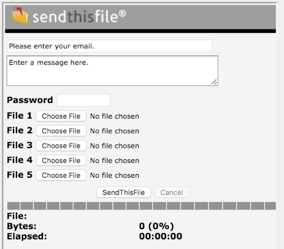
Steps to Upload Files
- Enter Your Information:
- Email Address: Input your email so we can identify the sender.
- Message: Provide a brief description of the files or any pertinent information.
- Authenticate:
- Password: Enter SendtoPeak to access the upload functionality.
- Select Files:
- Click on the “Choose File” button to locate and select the files you wish to send.
- To send multiple files, click on subsequent “Choose File” buttons.
- You can upload up to 5 files in a single session.
- Initiate Transfer:
- After selecting your files, click the “SendThisFile” button. A progress bar will display the upload status.
- Confirmation:
- Once the upload is complete, a confirmation message will appear indicating the successful transfer.
Security Assurance
Your files are protected with military-grade 256-bit AES encryption during transfer and at rest—the same encryption standard trusted by government and financial institutions. SendThisFile’s SSAE 16 SOC 2 compliant infrastructure ensures complete data confidentiality and security.
Need Assistance?
If you encounter any issues or have questions about the file transfer process, please call us at (303) 801-4772 or send us an email: info@peakadvisers.com.